Turn validated themes into a PRD your team can act on
AI drafts a real PM-quality document — objectives, success metrics, and a problem/solution write-up per item — grounded in the exact evidence you selected. Refine it with an AI assistant right beside the doc, save drafts as you go, and export to Word, PDF, or Google Docs.
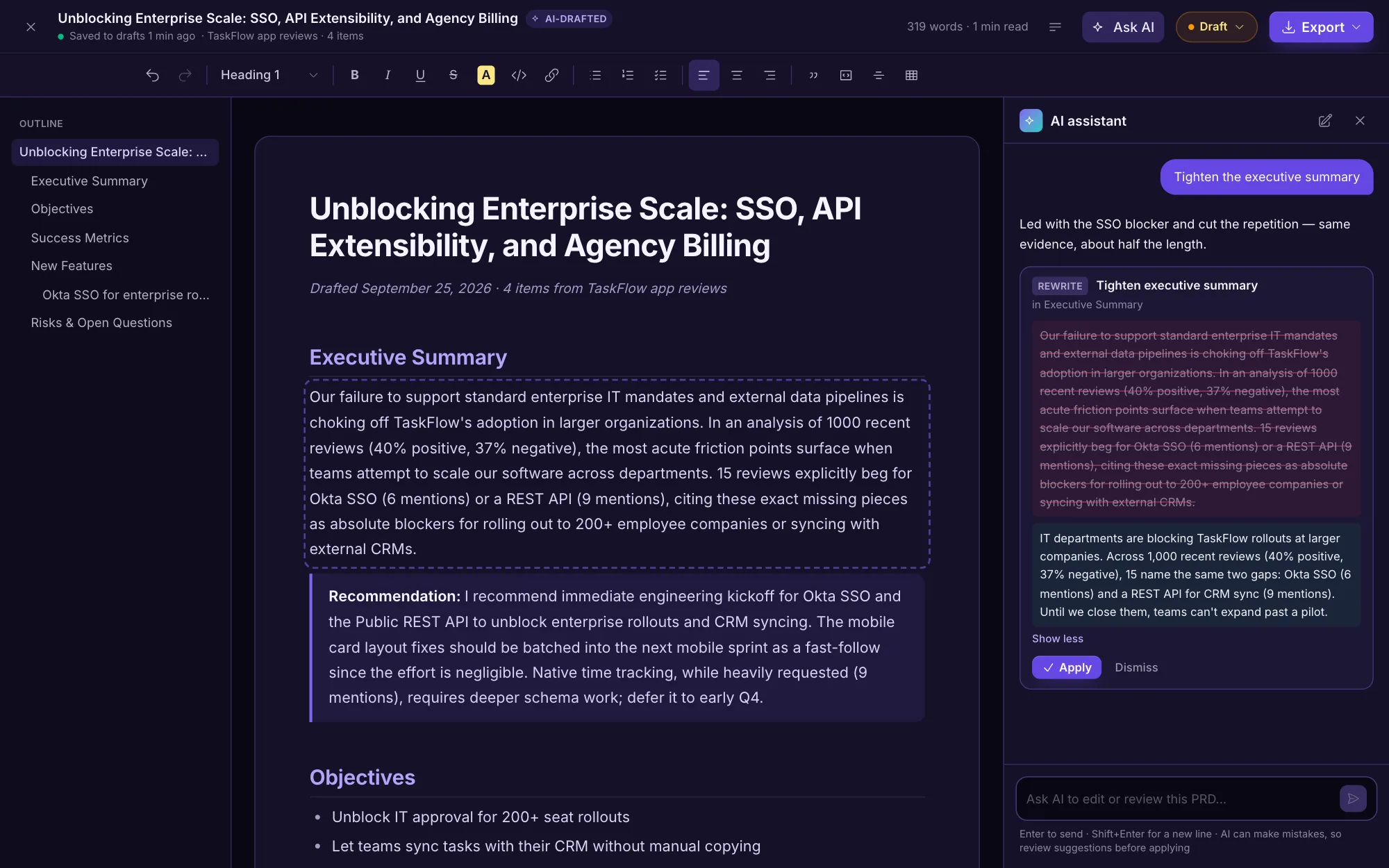
Everything under Draft PRDs
AI-written executive summary
A narrative executive summary and a highlighted recommendation, grounded in exactly the evidence you selected — not a generic template with placeholders.
Edit it right in ProductSight
Rewrite anything in a full document editor — headings, lists, checklists, tables, highlights, and links, with a / menu and Markdown shortcuts.
An AI assistant beside the doc
Ask for a rewrite, a review, or a new section, and get edits you preview and apply with one click. Select any text to shorten, expand, or sharpen just that part — nothing changes until you say so.
Drafts saved to your workspace
Save a PRD as a draft and every edit after that saves automatically. All your PRDs live in one place, so you — or anyone on your team — can pick one up later, from any device.
Draft or Ready at a glance
Keep a PRD marked Draft while it's still taking shape and switch it to Ready once it's reviewed, then filter your PRDs by status to see what's done.
Objectives & success metrics
Concrete objectives and measurable success metrics drafted for the initiative as a whole, not just a list of bullet points per item.
Problem, solution, and impact per item
Every item gets its own problem statement, proposed solution, user impact, and success metric — the structure a real PRD needs.
Priority & effort at a glance
Each item is labeled by priority and effort, so the document reads like a plan your team can act on, not just a list of ideas.
Evidence strength, not guesswork
Early signal, emerging pattern, or well-evidenced — computed from real mention counts, so confidence in the document matches confidence in the data.
Real quotes included
Up to three supporting quotes per item, so anyone reading the PRD can verify the evidence themselves.
Risks & open questions
A dedicated section surfaces what a careful PM would flag before greenlighting work — not just a highlight reel.
Export to Word, PDF, or Google Docs
Download a .docx or a text-based PDF, or send it straight to your Google Drive as an editable Google Doc — with your edits and formatting intact.
Ready to draft your first PRD?
Select items from your Action Board, get a PM-quality draft in minutes, and polish it with AI before you share.
Your feedback is never used to train AI models. Read our privacy policy